Originally published on Medium by Ant Open Source.

We are excited to release AReaL v0.2 (Boba), featuring three major milestones:
- SGLang Support: With the addition of SGLang support and a series of engineering optimizations, AReaL v0.2 achieves a speed improvement of 1.5x over AReaL v0.1 on 7B models.
- SOTA 7B Model: AReaL's RL training becomes more stable and sample-efficient. We obtain a SOTA 7B model in mathematical reasoning, achieving pass@1 score of 61.9 on AIME24 and 48.3 on AIME25 respectively.
- Competitive 32B Model: The highly competitive 32B model was trained with extremely low cost, achieving results comparable to QwQ-32B using only 200 data samples.
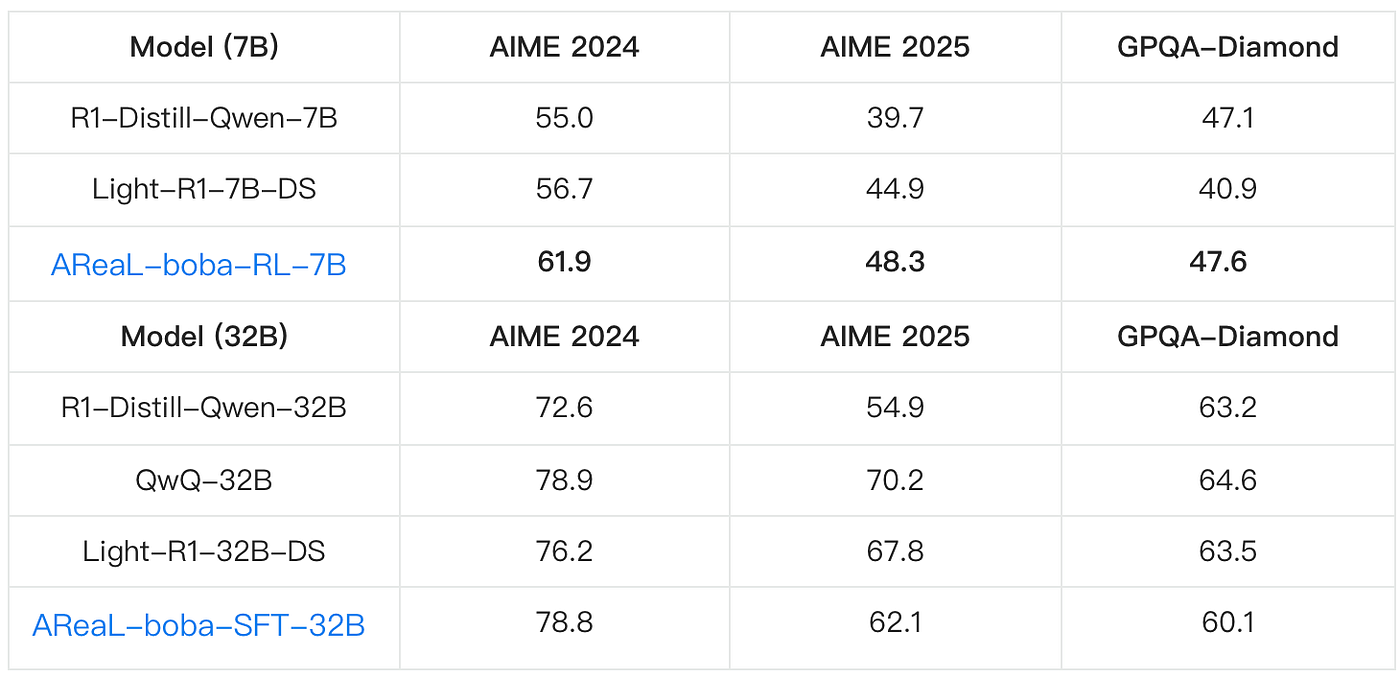
The table shows performance of AReaL-boba-RL-7B and AReaL-boba-SFT-32B. Note that we obtain SOTA 7B model using RL on math reasoning. We also train a highly competitive 32B model using only 200 data samples, replicating QwQ-32B's inference performance on AIME 2024.
Training Speed Comparison
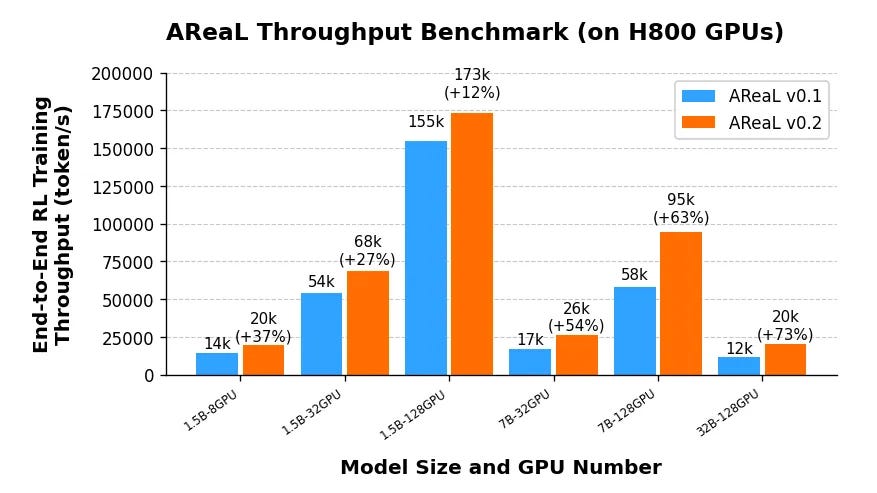
AReaL-boba throughput comparison with v0.1.0
AReaL v0.2.0 features the following system optimizations:
Upgraded Generation Backend: vLLM 0.6.3 → SGLang v0.4.0
The generation backend has been upgraded leveraging SGLang's radix attention mechanism to significantly improve throughput in scenarios where multiple responses are sampled from the same prompt. SGLang automatically flushes radix caches upon weight updates, ensuring correctness in on-policy RL.
Optimized Training for Variable-Length Sequences & Large Batches
To handle variable sequence lengths efficiently, we eliminate padding and pack sequences into 1D tensors instead. A dynamic allocation algorithm optimally distributes sequences under a maximum token budget, balancing micro-batch sizes while minimizing the number of micro-batches. This approach maximizes GPU memory utilization.
High-Performance Data Transfer for 1K-GPU Scaling
AReaL employs NCCL with GPU-Direct RDMA (GDRDMA) over InfiniBand/RoCE, enabling direct GPU-to-GPU communication that bypasses costly CPU-mediated transfers and PCIe bottlenecks. This keeps generation-to-training data transfer overhead below 3 seconds even in a large 1,000-GPU cluster.
Training Recipe
SOTA 7B model using RL on math reasoning
Base Model
We use R1-Distill-Qwen-7B as our foundation model.
Dataset Curation
Our training dataset (AReaL-boba-106k) combines resources from multiple open-source projects:
We enhanced this with challenging problems from NuminaMath (AoPS/Olympiad subsets) and ZebraLogic.
To maintain an appropriate difficulty level, overly simple questions were filtered out. Specifically, we generate 8 solutions per question using DeepSeek-R1-Distill-Qwen-7B and filter out questions where all solutions were correct.
Reward Function
We adopt a sparse sequence-level reward mechanism. The model is instructed to enclose the final answer within \boxed{}, and the boxed answer is then verified. Correct responses receive a reward of +5, while incorrect ones are penalized with -5.
Notably, we observe that the KL reward can impair performance, particularly in long chain-of-thought training, so we set it to zero.
RL Algorithm
We employ Proximal Policy Optimization (PPO) as our training algorithm and remove the critic model to save compute. We set both the discount factor γ and the GAE parameter λ to 1. Such practices are also adopted by the Open-Reasoner-Zero project.
Token-Level Loss Normalization
Averaging the loss at the sequence level can underweight the overall contribution of longer texts. To address this, we normalize the loss at the token level, as also highlighted in DAPO.
Rollout Strategy
During the rollout phase, we sample 512 questions per batch, and the LLM generates 16 responses per question — resulting in a total batch size of 8,192. To minimize output truncation, we set the maximum generation length to 27K tokens. In our experiment, the truncation rate remained below 5%.
Key Hyperparameters
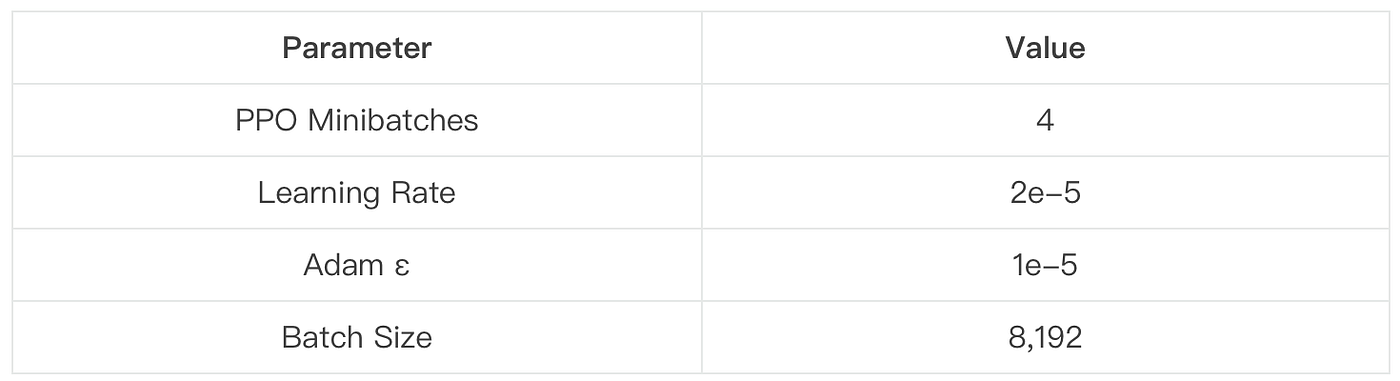
This configuration balances convergence speed with training stability.
For the 32B model size, we further refine the training data and release AReaL-boba-SFT-200, a high-quality dataset with only 200 data points. Accompanied by relevant training scripts, we replicated QwQ-32B's inference performance on AIME 2024 via Supervised Fine-Tuning (SFT).
Evaluation Best Practices
During evaluation, we use vLLM v0.6.3 as the generation framework. We recommend manually configuring the following options:
enforce_eager=True
enable_chunked_prefill=False
disable_custom_all_reduce=True
disable_sliding_window=True
Following the practice of DeepSeek models, we incorporate a directive in the prompt: "Please reason step by step, and enclose your final answer in \boxed{}." To encourage long context reasoning, we also enforce that the model begins each response with \n.
To ensure reliable pass@1 estimation, we:
- Sample 32 answers per problem
- Use temperature=0.6 and top_p=0.95 for SFT models
- Maintain training temperature (1.0) for RL models
Conclusion & Future Work
Our results demonstrate that high-quality data is equally critical as algorithmic innovations. When conducting RL training on a powerful base model, we require more challenging problems to facilitate learning. A straightforward strategy for data filtering involves removing problems that the base model consistently solves correctly across multiple sampling attempts.
AReaL delivers stable and fast training with cutting-edge model performances. Since initial release, we've continuously improved system efficiency, training stability, and accessibility.
Looking ahead, the AReaL team will:
- Further optimize system performance
- Introduce new features
- Continue open-sourcing training data
- Expand to broader reasoning tasks
We believe these contributions lower the barrier for high-quality RL training while pushing the boundaries of reasoning capabilities. We welcome community feedback and collaboration to drive further progress.


